

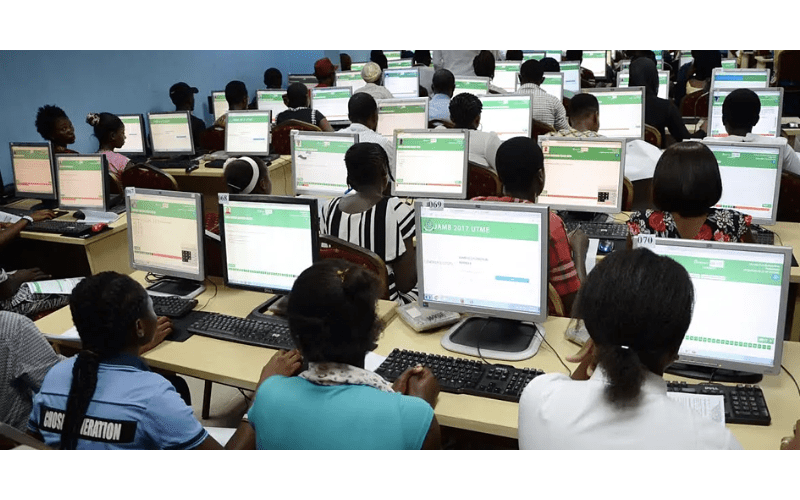
The Joint Admission Matriculation Board (JAMB) conducts the Unified
Tertiary Matriculation Examination (UTME) for all candidates seeking admission
to tertiary institutions. This year’s examination occurred in 870 accredited
Computer-Based Test (CBT) centres nationwide from April 24, 2025, to May 5,
2025.
It had a total of 2,030,627 candidates (excluding foreign candidates). A report by
the examination board identified that this year’s figure is the highest in
recent memory, surpassing the 1.8 million registered in 2022.
In comparison, the 2024 UTME recorded 1,985,642
registrations, a 24.4% increase from 1,595,779 in 2023. The 2022 examination
saw 1,867,743 candidates, 1,949,983 in 2020, while 2018 had 1,653,127.
Each year’s figure represents the increasing demand
for higher education and the availability of admission slots.
Before proceeding to check your result, ensure you
have a smartphone with good internet connectivity, while your registered email
address and phone number linked to your registration number must be intact.
How to check your 2025 UTME result online
Below is a step-by-step process for checking your
results online
Step 1: Visit
the JAMB result-checking portal.
Step 2: Enter your
details by inputting your registration number.
Step 3: Click on
“Check My Results”. Once clicked, your JAMB result will be displayed instantly.
You can screenshot or print it for future reference.
How to check JAMB 2025 results via SMS
Aside from connecting to the internet, you can also
check your result via SMS. Note that the phone number registered with your
registration number is vital for this process.
Step 1: Send a
Message to 55019 – By using the phone number linked to your registration
number, send UTMERESULT to 55019. Ensure you have
at least N50 airtime.
Step 2: Receive Your
JAMB Score – Once sent, your result will be sent as an SMS in a few minutes. If
you don’t get a response, try again later.
While you can easily check your result via this SMS
option, especially as it is the safest and most accessible, and you don’t need
internet, it is important to know that you cannot print it out and would need
to access the result online via the JAMB platform.
Common issues while checking JAMB Results
While checking your Jamb result online and offline is
a self-directed process, some issues might surface
1. “Result Not Available” Message: This
can imply that your result may still be processed. Try again later.
2. “Result Withheld” Message: This
means your result has been withheld by JAMB. All you need to do is visit the
JAMB office in your state for complaints and further clarification.
3. Incorrect Phone Number: Only
the phone number used during registration can receive results via SMS.
4. Network Issues:
You might experience delays owing to a weak internet connection while checking
your results online and offline. Ensure you have a strong internet connection
and an airtime balance of at least N50 (for SMS) before trying again.
If the issues persist after trying a few times, you
can reach out to the examination board through these official channels:
How to print your UTME Result Slip
Some schools require an official JAMB result slip for
admission processing. After you have secured admission to your school of
choice, an official result slip will also be required for the registration
process.
Here’s how to get it yourself:
Step 1: Visit
the e-facility
portal.
Step 2: Log in with
your email and password. This must be the email address used during your UTME
registration.
Step 3: Select
“Print Result Slip”
Step 4: Select your
examination year (2025 Unified Tertiary Matriculation Examination),
enter your registration number, and click on Print Result slip.
Step 5: Make the
required payment of N1,000 using a Mastercard or Verve card
Step 6: After
successful payment, you can now download your original result slip.
That is. all that you need to know.
Comments:
Leave a Reply